
Subscribe to our blog

Your email:

Color QC and Matching Blog

Current Articles | RSS Feed RSS Feed

Tip #5 – Monitor Spectrophotometer Performance


With today’s increasingly tight color tolerances and a global supply chain, it’s getting tougher to meet color specifications and tolerances.  How can you be assured that when you certify instrumental color data, you can do so with confidence?


This blog is the fifth in a series which describes how to manage a program of global color communication and electronic color standards.


Why is this important?

Instrument Performance can affect whether a sample passes or fails a quality inspection.  A large part of the tolerance can be taken up by inter-instrument agreement or by instrument drift.  Color tolerances frequently are set at less than 0.5 DE, and with instrument uncertainty and drift of 0.2 DE, 40% of your tolerances is taken up just with instrument variation and uncertainty.

white and black calibration tiles

It’s important to know that your instrument is measuring in within specification.  White and black calibration and a green tile test are typically used for instrument calibration.  The green tile test is good for independently validating that the instrument has been calibrated properly. 


Is the Green Tile Test really enough?

 green tile test

On most spectros, the operator can put any white or near white sample at the port in place of the white calibration tile and the instrument will calibrate successfully without flagging that the wrong standard was used for calibration.  The green tile test assures that the calibration was performed correctly.  However, it does not check for wavelength and photometric errors, so that you could get a successful green tile test, but the instrument could still have other issues that would show up when you measure colors in a different part of color space over a broader color gamut.


What else can I do to make sure my instrument is measuring color properly?

You need to monitor your instrument performance on a regular basis (let’s say monthly) to make sure that it hasn’t drifted or changed and that it’s working properly.  A daily green tile test is not enough.  While the green tile test can screen for gross changes in the instrument, it’s just not sensitive enough to meet today rigorous standards of instrument performance.  With the right software and a set of Diagnostic Tiles, you can monitor your instrument’s performance properly.  This way you’ll know when something has shifted or changed—hopefully before your batch of product gets rejected for not meeting the color specification.


Annual certification is not enough

Often instruments are certified in the field by a technician without sending them back to the service facility for cleaning and preventative maintenance.  Many companies rely on this annual re-certification of their instrument to tell them if it is not performing up to factory specification or to bring it within spec.  Doing this test only once a year allows too much time between checks and the re-certification of the white calibration plate is not enough to tell you how the instrument performs over the whole color gamut. 


Run a Monthly Diagnostic Performance Evaluation

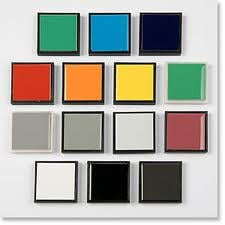
We recommend that you run a monthly instrument performance evaluation using a set of diagnostic tiles.  The set that we recommend (shown below) contains 16 specially selected ceramic tiles.  Ceramic tiles are recommended because of their long-term color stability and durability.  The tiles are screened for translucency and thermochromism, and the gamut is chosen for optimal monitoring of wavelength and photometric errors.

 diagnostic tile set

The Diagnostic Tile set is measured using a special software algorithm as part of the OnColor Profiler package that tracks and trends changes in the instrument performance.  A tolerance for instrument deviation on each tile and the average over all 16 tiles must be met.  The test should be performed at least monthly if not weekly with the results being tracked and archived to document each instrument’s performance.  This way as the instrument drifts or a malfunction occurs, you have a recent record of how the tiles measured for comparison.  If any deviation is out of the normal range or specification, then it’s time to send the instrument back to the factory for service and repair.  This also gives you a benchmark for how the instrument was reading before it was sent out, so you know whether the readings have shifted or not.


Use this test to certify vendors or provide ISO documentation

By printing and logging the results of this test, you can use the reports to certify your vendors or other facilities within your organization.  The documentation can also be used to show ISO compliance.  Knowing that your spectrophotometers are reading color correctly gives you peace of mind and confidence in your results.  Passing this information along to your customers builds confidence in your technical color management capabilities and builds rapport with your cusomers.


Ensuring that your spectrophotometer is measuring color properly is a cornerstone to having a successful color management program.  The test only takes a few minutes each time to run.  In the long run, performing this instrument diagnostic can save you time and rejections for color by catching instrument problems before they cause color complaints and rejected batches. 

CyberChrome's OnColor software and color experts can help you setup and manage your spectrophotometers properly.

call-for-advice

Tip #4 - Inter-Instrument Agreement


What is Inter-Instrument Agreement? Should I care?  How do you determine it?   How do I know what my numbers are?  Can I measure it myself?

 Inter-instrument agreement is a measure of how closely two or more color instruments read color the same.  In layman’s terms it measures how close your absolute L*a*b* readings are to someone else’s on the exact, same samples. 

 Why should I care about inter-instrument agreement?  The most important reason is to be able to share electronic color standards and colorant databases.  If you are trying to compare the color values taken on your spectrophotometer to those taken on another spectro, conventional wisdom has long held that you could compare the deltas or color differences on a set of samples, but not the absolute values.  However, in today’s workplace technology has made it extremely easy to communicate absolute as well as color difference values.  Many companies are successfully sharing electronic color standards not only within a company but within a supply chain around the world.


 How do you determine the inter-instrument agreement?  color tile setTypically inter-instrument is a test done by the instrument manufacturer in the quality assurance process of manufacturing an instrument.  The new instrument is compared to the “master” instrument or the average of a population of typical instruments.  Usually a set of 12 BCRA tiles plus a white and black tile are used for the test.  The tile set is measured on the target instrument and compared to the known values as measured on the master instrument.  A color difference for each tile is calculated between the master and the target instrument.  Then the DE’s are averaged over all the tiles and this number becomes the Inter-instrument agreement for the target instrument.  Manufacturers of instruments publish their specification or limit for the DE between instruments.  The average DE over these 14 tiles must be less than this number to “pass” their quality control testing.  Each DE on an individual tile must also be less than a certain limit, although this limit is not always published.


What if I want to compare my spectrophotometer to my supplier’s or someone else’s instrument in the supply chain?  Can I do this myself?   Certainly you can.  First you need to understand that when instrument manufacturers do this test, it is always in very controlled conditions for temperature and humidity.  You will need a set of durable and stable color standards such as BCRA tiles or a Diagnostic Tile Set from Mount Baker Research.  Ceramic tiles are the best transfer standards to use since they are the most stable and durable materials currently available. 


The same set of ceramic tiles must be read on each instrument under controlled conditions of temperature and humidity.  The instrument settings for specular component, UV component, and aperture size and lens setting must be the same for both instruments.  The readings from the target instrument are then compared to those from the master instrument and a DE is computed between the two readings.  Usually D6500, 10 ° observer, and CIE L*a*b* are used for the comparison.  After obtaining a DE for each tile, the average DE for all the tiles is computed and this is the value typically used to specify Inter-Instrument Agreement.


What kind of numbers should I expect?  What can I do to make it better?

You may be surprised to find out that your inter-instrument agreement numbers are larger than the published data from the manufacturer.  First of all, when done by the manufacturer, the reference instrument is always an instrument that has been maintained in pristine condition and is designated for this purpose.  When you do the test, you are comparing two production machines that may be as far apart as allowed.  Therefore, if the specification on the IIA is DE*<0.15, then it’s possible for the two units under test to be as far as 0.30 apart and still be in spec.  While that is not the normal case, the bigger difference can be attributed to the actual wear and tear and environmental conditions that the instrument is used under.  No doubt all instruments will meet the manufacturer’s spec “right out of the box”.  However in the “real world” of color measurement, instruments are used under less than pristine conditions, and dust and dirt can wreck havoc with the fine optics of a spectrophotometer.


What can you do to make it better?

A disciplined approach to monitoring instrument performance is crucial.  The simple daily calibration routine is not enough to ensure that your spectro is performing within specification.  While adding a daily green tile test to the routine is advisable, it is still not the complete answer to knowing whether your instrument is measuring color precisely.

There are two things can do to ensure that your instrument is working properly.  Tip #5 in this series will tell you how to do this and Tip #6 will discuss how instrument profiling is used to give you the best possible IIA between spectrophotometers.

Tip #3 – The Physical Color Standard


 Before generating an electronic color standard, a physical standard needs to exist and be measured to generate the electronic data.  Here are some guidelines for selecting the specimen and storing and handling it:

  • The standard should be flat, smooth, clean, homogenous, and free of physical imperfections
  • It should be completely opaque for reflectance measurements or completely transparent for transmission measurements.  Translucent samples have their own set of needs where sample thickness and backing are very important and need to be clearly specified and controlled.
  • They should be made of the same materials and coloration as the product they represent; for coatings and plastics, this means that they should be made from the same resin or vehicle and use the same pigmentation; for textiles, ideally they should be made of the same fiber and use the same dyes
  • The specimen must be large enough to cover the instrument sample port and ideally be several times that size to allow for averaging of several spots over the entire sample
  • Any sample that exhibits directionality should be rotated 90° and averaged for at least 4 readings.
  • When selecting material to establish a master standard, enough material should be set aside to make numerous specimens.  You’ll want to have a few standards that you keep in reserve. 
  • When creating an electronic color standard, each master standard should be screened to make sure that it represents the standard to within a very tight tolerance.  The way to do this is to select a number of plaques or specimens to be considered.  Let’s say 20 or double the amount that you need.  Measure all specimens and then calculate an electronic average of these 20 (or whatever number you need).  Use this average and then compare all of the specimens to the average and select those that are within a very tight tolerance (e.g. DE=0.10) to be considered as master standards.  Any specimens that fall outside of this range should be discarded as not suitable.

 deriving a color standard

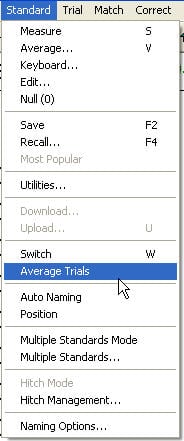
In OnColor this is easy to do.  After measuring all of the specimens as Trials, use the Option under Standard-->Average Trials to compute a new electronic standard that is an average of all of the trials.  OnColor then instantly makes this calculated average data the new Standard and all Trials are compared to this new derived standard.  Discard any specimens that are greater than DE=0.10 away from this average. 


  • Any specimens that qualify as master standards should be labeled as such including the name, date and time of measurement and the L*a*b* data and deviation from the electronic standard.


You can use the Label printing feature in OnColor to print a custom label for a Master Color Standard including this information.  A generic label is shown below:

 color standard label

  • All master standards should be protected from unnecessary exposure to light, heat, and humidity.  Typically they may be stored in a freezer packaged in an individual envelope to minimize degradation due to aging.
  • Using Pantone standards of ink on paper does not make a good color standard unless you are printing inks on paper and using the same materials as Pantone.  For all other industries, it is much better to follow the third guideline above and use a standard that is made of the materials found in the end product.

 The most successful color management programs pay close attention to developing and maintaining the color standard.  How do you manage your physical color standards?

Tip #2: Measurement Conditions and Color Parameters


electronic color standardsThe next fundamental rule in sharing electronic color standards  is that the color parameters using in the calculation of the coloriemtric data must be the same.

Remember to follow the rules given in Tip #1 for sharing electronic color data, which first and foremost is that the instrument geometry must be the same.


Measurement Conditions:

  • Is the measurement done via %R or %T?  Not all instruments measure both %  Reflectance and %Transmittance.  It's usually assumed that the measurement is reflectance, but it's better to specify it rather than to guess.
  • For a sphere instrument, is it SCI (Specular Component Included) or SCE (Specular Component Excluded)?
  • What is the aperture size?
  • What is the UV setting?  Is the UV included, excluded, or partial?

In OnColor, each measurement is tagged with a status code that identifies the measurement conditions at the time of measurement along with the date, time, and name of the sensor.


Color Space Parameters:

  • Standard Observer - Is it 2 degree or 10 degree observer?
  • Illuminant(s) - If you are looking at colorimetric data, it's important to specify the illuminant that was used for the calculation.
  • Color Space - If you are sharing Lab data, make sure you specify L*a*b* or CIE Lab vs Hunter Lab.  The two are very different.  If using another color space, be sure to specify exactly what it is so that it is unambiguous.

Each OnColor save-set file contains this information along with the tolerances for the standard.

Be sure to include this information along with the color data whenever you share electronic color standards within your company or within your supply chain.


Using OnColor color matching software with a USB adapter - 64 bit PC


While many of the new spectrophotometers on the market today are equipped with a USB cable to connect to the PC, most of the older models still use a serial communications cable to communicate with the PC.  USB to serial adapter cables can bridge the gap for those PC's that do not have a serial port installed on their PC. There are many such devices available, but not all work well with the high demands of data transfer of a color spectrophotometer--especially not on a 64-bit PC.

This blog post updates our recommendation for a USB adapter that works well under Windows 7 on a 64-bit computer.  Many of the USB adapters on the market do not have a driver that works under a 64-bit operating system.  We’ve tested and found the Belkin F5U-257USBto Serial Adapter Cable to work with most spectrophotometers under the following configurations:

  • Windows 7 (64 bit)
  • Windows 7 (32 bit)
  • Windows Vista (32 bit)
  • Windows XP (32 bit)

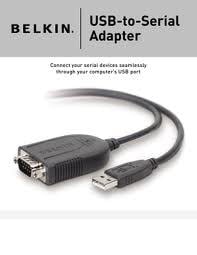
The driver was automatically found on each of these operating systems and communications was established with the color sensors.  This is the cable that we are recommending to OnColor users.Belkin USB to serial cable3

 For those users that have the older model, Belkin F5U-409, a driver exists that will make that device work on the listed Operating Systems, too.  It can be found on the OnColor installation CD under the \Support folder in the current release of OnColor.

The Belkin F5U-257 is readily available from many On-Line stores.

The original blog on this topic contains some good advice for installing this adapter.

Tip #1: Instrumentation for Sharing Electronic Color Standards


Color Instruments

It all starts with the instrument you choose!  The single most important element in communicating electronic color data is the spectrophotometer.  You must use spectrophotometers; colorimeters ( by this I mean 3 filter tristimulus colorimeters) are not designed to be “absolute” instruments and are not suitable for sharing absolute color data, such as electronic color standards.  They are designed to be “difference” meters.  So using a spectrophotometer is essential to success!

When communicating electronic color data, you need to specify the make and model of the instrument.  This defines the instrument geometry.  Also, note that it’s not possible to mix sphere (d/8) geometry with 45/0 geometry.  You can’t share absolute data between instruments that have different geometries.   That means you can’t mix sphere geometry with 45/0 or 0/45 geometry.  The instruments just read and handle the gloss of a color differently.  One is not right and the other wrong; they are just different in the way they measure color and handle the specular reflectance or gloss.  

While the higher end benchtop spectrophotometers provide the best precision and accuracy, many of today’s handheld or portable spectrophotometers are also well-suited to the task.   Instruments from the same manufacturer tend to have better inter-instrument agreement than when mixing spectros from different manufacturers; and those within the same make and model from a manufacturer will yield the best inter-instrument agreement.  So unless you are using instrument profiling, your best chance for getting instruments to agree on a color measurement is to stick with the same make and model.  More on instrument profiling in Tip #4.

 Instrumentation must be kept in tip-top condition.  Your instrument should be monitored on a regular basis and standardized yearly.  A daily green tile test is a good screening tool to verify that the instrument was calibrated properly and can catch any gross errors in the instrument performance.  But the green tile test is not a guarantee that your instrument is reading all colors properly and can’t detect subtle changes in drift and aging.  You should also do a monthly diagnostic test with an extended set of ceramic tiles.  A future blog on Tip #5 in this series on “Monitoring Your Instrument Performance” will address this topic.

To summarize:

  • Use a spectrophotometer, not a colorimeter
  • You can’t mix sphere geometry with 45/0 or 0/45 geometry
  • Use the same make and model of spectrophotometer
  • Make sure the instruments are serviced annually

10 Tips for Using Electronic Color Standards


Global color communication

Using electronic color standards and sharing L*a*b* color values is the goal of many companies and their supply chains these days. It’s easy, fast, and convenient.  If we’re all using the same numbers for our color target, isn’t that the best way to assure that we’re all matching to the same color?  It is certainly more convenient than shipping samples around overnight.  But before you do so, you need to understand the best practices of color measurement and for setting and maintaining numerical color standards.  Many color disputes arise these days because color instruments don’t necessarily read the same.  Electronic or numerical color standards are widely used and shared within a supply chain and have many benefits, but if all of your instruments are not regularly monitored and calibrated, then problems can arise. 

Electronic color standards are used widely in the coatings, plastics, textile, and printing industries.    As Shelley Sturdevant, the North American Technical Director for Coil and Extrusion Coatings for PPG will tell you, the benefits are huge in terms of consistency of color, easy global color communication, and cost effectiveness if done properly.  Color can be communicated instantly around the world and manufactured consistently to the same stored color standard.  Electronic color standards are permanent and don’t change with use and over time.  Read more of her comments in “Spot On:  Lessons From a Color-Matching Master”.  But what do you need to know and understand about the process in order to make it work for you?  This blog lays out 10 key points that you need to pay attention to and sets the stage for the next 10 blogs which will delve into each item in more detail.

Future blogs will discuss each of these 10 aspects of using electronic color standards to help you avoid some of the pitfalls.  Click on the links below for a more detailed discussion of each topic:

  1. Instrumentation – It all starts with the instrument! 
  2. Measurement Conditions – What do you need to specify?
  3. Physical standards – Don’t I just grab a sample and measure it?
  4. Inter-instrument agreement - How do you determine it?   What if I want to compare my spectrophotometer to my supplier’s or someone else’s instrument in the supply chain?  Can I do this myself?
  5. Monitor Instrument Performance –Is the green tile test really enough?
  6. Instrument Profiling – or how to improve your inter-instrument agreement
  7. Sharing the data – How?
  8. Sample presentation – What are the variables?
  9. Translucency & Fluorescence – What types of physical samples just don’t work well with electronic standards?
  10. Do an audit – The ultimate test for “Is it really working?”

Does your company use electronic color standards?  Within just your company or with your supply chain?

Using a USB Adapter to Connect your Spectrophotometer to OnColor


When you buy a new PC these days, it typically doesn't come configured with a serial port.  This once standard type of port has been replaced by USB ports.  However, many spectrophotometers still use serial communication and are supplied with a serial cable to connect to the PC. Then how are you supposed to connect your spectrophotometer to the PC if ti doesn't have a serial port? The solution is to use a Serial to USB adapter cable which allows you to connect your color computer via a USB port.

Connection to a color computer

The installation process can be tricky, so here are some things to remember when using a serial to USB adapter to connect your spectrophotometer to OnColor software:

  • Not all serial to USB adapters are created equal.  Cheap doesn't cut it when it comes to these devices.  Make sure you purchase one that is compatible with the operating system you plan to use it with.  So check that the drivers are included for whatever version of Windows you are running.
  • We've had great success with the Belkin model of USB to serial adapter.  While many other models may work fine, this brand gives consistent results.
  • Make sure you install the appropriate drivers.  A CD is usually provided with the cable.  Generally, you must install the driver BEFORE you plug in the cable to the USB port.
  • During installation of the driver, pay attention to what COMM port (communications port) the device is assigned to.  You will need to know this in OnColor when you go to establish communications with the spectrophotometer.  If you forgot to look, then go to:

 Control Panel

-->System

-->Hardware

-->Device Manager

-->Ports

then look at the assignments for the comm port.  One of them should be assigned to your adapter.  Note the number of the comm port, as this is what you will need later in OnColor.

  • After installing the driver for the adapter and figuring what comm port it was assigned to, then you are ready to connect the spectro and establish communications with OnColor. Connect the adapter to the PC and to the spectro and be sure to turn on the power to the instrument.  In the Communications Dialog box, select the comm port that you noted in the previous step.  Then Test Settings and your communications should be successful.
  • If you get a message that says  " Error ( -2 ) COM port is not supported or is being used by another device," then the device is not setup properly or you have not installed the driver correctly.Spectrophotometer error message


Are you using a serial to USB adapter to connect your spectrophotometer to OnColor?  Is so, please comment below and tell us the brand you are using so that other users can benefit from your experience.

Converting a Colorant Database for Computer Color Matching


 When upgrading their color matching software to OnColor, many customers want to convert an existing colorant database so it can be used in OnColor.

 Can it be done?  Absolutely!  However, management and the software users need to understand the Pros and Cons of doing so.

 PROs:computer color matching database

  • Speed – It’s faster and easier to take an existing database and convert it rather than make a new one.  You can get up and running much quicker.
  • Resources – It takes time, lab equipment and personnel to make a new database.  Converting a database avoids all of this expense.  (Or does it?   Are you really just paying the price in other ways by taking more hits and getting less accurate matches and corrections?)
  • Burden – The burden is on someone else to do the work and get it done correctly.

 CONs:

  • Accuracy of color matches– How accurate is the existing database?  When was it prepared?  We often are asked to convert databases that are 5, 10 and even more years older.  This begs the question of are the raw materials the same.  Inevitably when we ask this question, the answer is a hedge or an outright “No”.  Is the processing equipment the same?  Often procedures or equipment have been upgraded or changed.  A new database will yield the best color matching accuracy and will result in fewer hits per match and fewer adjustments in production.
  • Optimized Samples Set – Each manufacturer of software package has its own set of recommended samples that work best with its software.  Technology changes quickly these days and so do the methods for getting the most out of your color software.  You will get the best results by heeding the recommendations of your supplier.

 Management ultimately must understand what is being sacrificed by using an old, existing database.  How many samples need to be prepared to make the database vs. how many more hits is it going to take to match and correct every color?  And perhaps the most critical, what is it worth to get production approved in fewer hits and in many cases get “good” answers where the older database doesn’t give reasonable answers?

 At CyberChrome we understand that only you can answer these questions.  Our mission is to help you get the most out of your OnColor software.

 Need help with optimizing your colorant file or convincing management why it’s time to re-do the database? We can also recommend some tests to tell you how accurate your database really is.   Color matching database

Color Management: The Pathway to Consistency


 This blog post was authored by John W. Root of Mt. Baker Research.

Workers in digital imaging and publishing use color management to achieve consistency throughout a workflow. The goal is to preserve the quality and accuracy of an image from capture to final reproduction. Each device in the workflow supports a different color space. The available color management systems profile the gamut capabilities of each device, and then limit the working color space to the gamut that is shared by all of them.

The workflow used by color metrologists is different. Many labs employ more color spectrumthan one instrument to measure color or appearance and to assure quality control. Here we'll focus on measurements of spectral reflectance factors ("SRF") for uniformly colored samples. A spectrophotometer is used to measure SRF data throughout the visible spectrum, which extends from 400 - 700 nm.

Different instruments may not output the same SRF data based on measurements of the same transfer standard. In this situation tests of inter-instrument agreement may be used to measure the consistency between the participating instruments. Depending on the outcome of these tests, color management may be required to enable the meaningful sharing of SRF data.

Inter-instrument agreement cannot be achieved unless the test instruments employ the same geometry. See Color Geometry: A Matter of Degrees (another post within this blog) for a discussion of geometry.

In printing and the graphic arts metrologists who use sphere-based instruments employ the (d/8°) diffuse hemispherical specular-excluded ("SCE") geometry. Others prefer the (0°/45°) or (45°/0°) bi-directional geometry. Because gloss is important in the manufacture of paints and architectural ceramics, in those industries metrologists prefer the (t/8°) total hemispherical specular-included ("SCI") geometry, although certain segments of the coatings industry, namely coil coating, have standardized on 45°/0° geometry.

Among comparable instruments that use the same geometry, other factors may lead to differences in the measured SRF data. Before listing these factors, we stipulate that the instruments to be compared are maintained in good working order, and that suitable procedures are used to achieve consistent sample quality and to measure accurate SRF data.

Differences in the SRF values measured by comparable instruments may result from the following types of wavelength-dependent error: (1) Photometric scale. (2) Wavelength scale. (3) Bandwidth.

The standard multivariate regression procedure that is used to characterize these errors was described in the open literature more than 20 years ago. In a complementary approach, during 2009 the author developed transfer standards that are optimized for detecting these errors. For more information see Color Measurement Accuracy: Diagnostic Procedures   (another post within this blog).

The multivariate regression procedure detects and measures the following errors: (1) Photometric zero (black point). (2) Photometric linear scale (100% reflectance line). (3) Photometric nonlinear scale. (4) Wavelength scale. (5) Bandwidth. This method cannot compensate for differences in instrument geometry, or for the errors that result from thermochromism or lateral diffusion. For a discussion of translucency see Color Measurement Accuracy: Translucent Materials (another post within this blog).

CyberChrome's OnColor Profiler® profiling system can analyze the errors listed above on most of the instruments that are in use today. This system includes software and 32 reduced-translucency transfer standards that are optimized for profiling. The OnColor Profiler® software compares the SRF data measured on each test instrument with data from a master instrument. The software generates correlation coefficients, or correction factors, that may be used to improve inter-instrument agreement with the master instrument. See How to improve Inter-instrument Agreement with Instrument Profiling (another post within this blog).

The author of this article is John W. Root Ph.D. of Mt. Baker Research who can be reached via email at jackroot@mtbakerresearch.com.

All Posts